A surge in Instagram password reset emails, combined with a potential data leak, has raised concerns. Learn how to protect your account and stay safe online.
A recent surge in unexpected password reset emails sent to Instagram users has sparked concerns of a potential security breach, particularly after reports surfaced of a dataset containing over 17 million Instagram accounts being leaked on the dark web. While Meta, Instagram’s parent company, has downplayed the situation, confirming no breach of its systems, the simultaneous appearance of these emails and the leaked data has left many users worried about their account security.
What Led to the Instagram Password Reset Emails?
In January 2026, Instagram users began receiving multiple password reset notifications from [email protected]. Many users had not requested the resets, with some receiving repeated emails within short periods. Initially, this sparked fears that their accounts were being actively targeted.
Meta confirmed that the emails were caused by a bug that allowed external parties to request password resets for other users. The company stated that the issue had been resolved, emphasizing that no breach had occurred and that user accounts remained secure. However, Meta has yet to provide details on how the bug was triggered.
Despite no confirmed data leak from Instagram itself, the leaked dataset, which appeared to contain previously scraped data from 2024 and 2022 API incidents, included sensitive user information like usernames, emails, and phone numbers—though not passwords.
Why Should You Care About the Password Reset Emails?
While the password reset emails were legitimate, they can also be part of a broader phishing strategy. Attackers often exploit “alert fatigue,” sending repeated reset requests to wear down users. Eventually, users may ignore genuine security alerts, mistaking them for false alarms. This gives attackers a window of opportunity to strike.
How to Change Your Instagram Password Safely
If you need to change your password, always do so directly through Instagram:
- Open the Instagram app and go to the Accounts Center.
- Select Password and Security.
- Tap Change Password and enter your current and new password.
- If you suspect unauthorized access, select Log out of other devices.
- Click Change Password to confirm.
How to Reset Your Instagram Password
If you’ve forgotten your password and can’t log in, follow these steps:
- Open the Instagram app and tap Forgot password?.
- Enter your username, email, or phone number and select Continue.
- Check your email for a Reset your password link and click it.
- Enter and confirm your new password, then click Reset Password.
How to Keep Your Instagram Account Safe
To safeguard your account from future threats:
- Use a Unique, Strong Password: Ensure your password is long, complex, and used exclusively on Instagram. A password manager can help generate and store secure passwords.
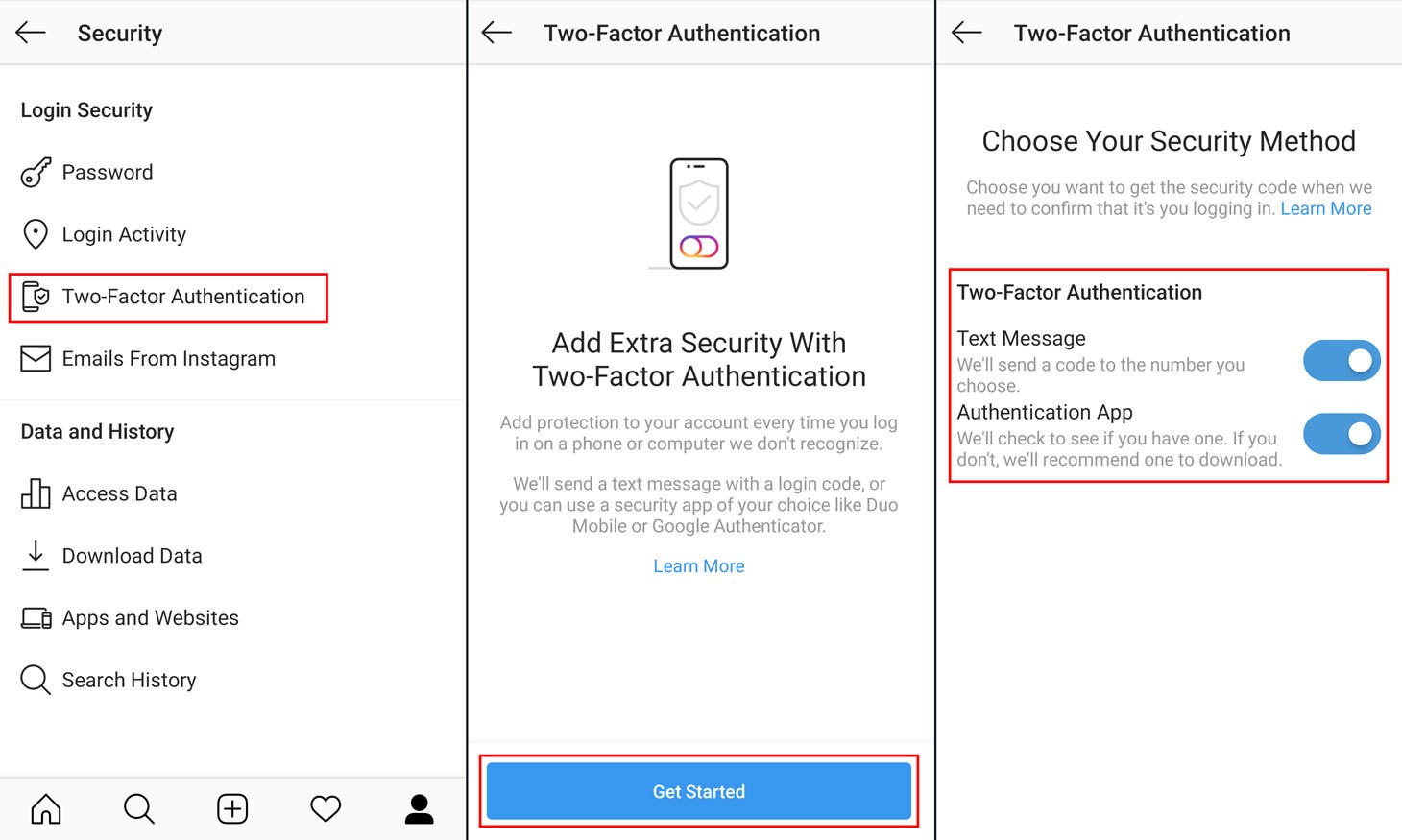
- Enable Two-Factor Authentication (2FA): This adds an extra layer of security, requiring a one-time code when logging in. To set up 2FA:
- Open the Accounts Center in the Instagram app.
- Go to Password and Security, select Two-Factor Authentication, and choose Authentication App.
- Copy the key and add it to your password manager (like Proton Pass) for easy access.
- Stay Alert for Phishing Scams: Be wary of phishing attempts that use similar-looking emails or texts from Meta support, urging immediate action. Always verify the sender’s authenticity.
Stay Safe with Proton Pass
Proton Pass is a free password manager that secures your data with end-to-end encryption, keeping your credentials, including 2FA codes, safe. It detects weak or reused passwords, inactive 2FA, and alerts you if your data appears in a breach.
By using Proton Pass, you can stay one step ahead of cybercriminals, keeping your Instagram and other accounts protected from evolving threats.