

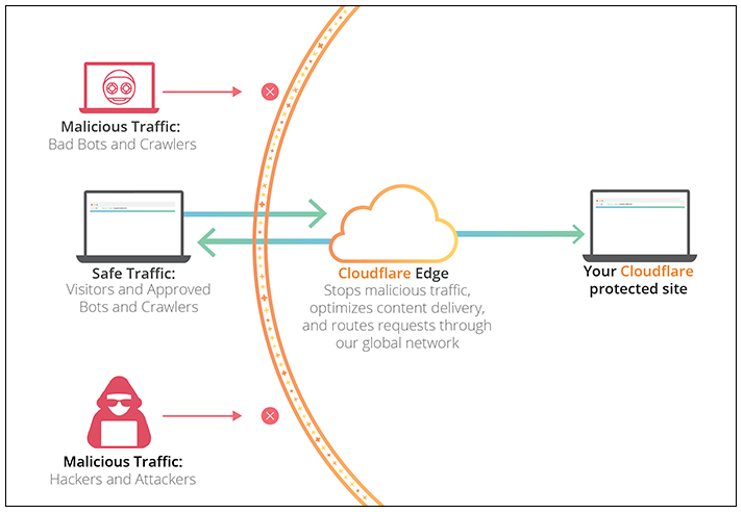
When it comes to improving website performance, Cloudflare offers a wide range of powerful services. Cloudflare’s innovative tools can significantly boost your site’s speed, security, and reliability. Whether you’re a small business or managing a large-scale website, Cloudflare can help ensure that your visitors have a seamless experience. In this article, we will dive into how you can leverage Cloudflare to enhance your website’s performance and security.
1. Improve Website Speed with Cloudflare’s CDN
One of the most effective ways to improve website performance with Cloudflare is by using its Content Delivery Network (CDN). A CDN distributes your website’s content across a global network of servers, so it’s delivered from the server closest to your user. This reduces latency and speeds up page loading times.
How the Cloudflare CDN Works
When a user visits your website, the request is routed through Cloudflare’s network. Instead of connecting to your main server, the content is served from the nearest Cloudflare server. This improves loading times, especially for international visitors.
Benefits of Cloudflare’s CDN:
- Faster loading times for users worldwide.
- Reduced server load and bandwidth usage.
- Better user experience, leading to lower bounce rates and higher engagement.
2. Enhance Security with DDoS Protection and WAF
Another significant way to improve website performance with Cloudflare is through its DDoS protection and Web Application Firewall (WAF). These security tools help protect your website from large-scale attacks and other malicious threats that could slow down or even take your website offline.
Cloudflare DDoS Protection
DDoS protection prevents attacks designed to overwhelm your server with a flood of traffic. Cloudflare automatically mitigates these attacks, allowing your site to maintain performance even during a high-traffic event or an attack.
Web Application Firewall (WAF)
Cloudflare’s WAF protects against common web vulnerabilities, including SQL injection, cross-site scripting (XSS), and bot attacks. The WAF filters out malicious traffic, keeping your site safe and improving security without slowing down performance.
Key Benefits:
- Protects your website from attacks that cause downtime.
- Keeps malicious traffic away from your website.
- Ensures fast, secure browsing for your visitors.
3. Secure Your Website with SSL/TLS Encryption
SSL/TLS encryption is essential for securing user data and improving trust in your website. Cloudflare provides free SSL certificates, enabling HTTPS on your site to ensure that all data exchanged between the user and your site is encrypted.
How SSL Improves Performance
Having an SSL certificate also boosts your site’s SEO rankings. Google gives priority to websites with HTTPS, which is a ranking factor. Cloudflare provides this service for free, helping you maintain a secure website while improving your SEO.
Benefits of Cloudflare SSL/TLS:
- Secures data transmission between your website and its visitors.
- Improves your website’s trustworthiness.
- Boosts SEO rankings by enabling HTTPS.
4. Reduce Server Load with Caching and Optimized Content Delivery
Cloudflare allows you to cache static content like images, JavaScript, and CSS on its servers. This reduces the load on your origin server and ensures faster page load times for repeat visitors.
Cloudflare Caching
Caching stores copies of your website’s content on Cloudflare’s edge servers, so Cloudflare can serve the cached version to visitors instead of requesting it from your origin server each time. This significantly improves the website’s speed, especially during periods of high traffic.
Cloudflare Optimization Features:
- Polish: Optimizes images and reduces their size without compromising quality.
- Rocket Loader: Improves the speed of your JavaScript by loading it asynchronously.
5. Boost Mobile Experience with Cloudflare’s Mobile Optimization
Cloudflare offers features that can optimize your website for mobile users. Mobile-optimized content loads faster, providing a smoother experience for users on mobile devices, which is critical as more traffic comes from smartphones.
Cloudflare Mobile Optimization Features
- Auto Minify: Reduces the size of CSS, JavaScript, and HTML files, which can be crucial for improving mobile performance.
- Mobile Redirects: Ensures that mobile users are automatically redirected to a mobile-optimized version of your website.
Benefits:
- Enhanced mobile user experience.
- Faster loading times for mobile users.
- Reduced mobile bounce rates.
6. Leverage Cloudflare Workers for Serverless Computing
For developers looking to improve website performance with Cloudflare, Cloudflare Workers offer serverless computing capabilities. With Cloudflare Workers, you can execute JavaScript code directly on Cloudflare’s edge servers. This reduces latency by bringing code execution closer to the user.
Cloudflare Workers Benefits
- Run custom logic without managing servers.
- Enable faster execution of web functions, such as A/B testing and authentication.
- Reduce latency by running code at the edge.
Benefits:
- Faster response times for users.
- Serverless architecture reduces overhead.
- Scalable application performance without the need for complex server setups.
How to Implement Cloudflare on Your Website
- Sign Up for Cloudflare: Start by signing up for a free account at Cloudflare.
- Change Your DNS Settings: Once you add your website, update your DNS records to point to Cloudflare’s nameservers.
- Configure Settings: Enable the features that best suit your website’s needs, such as CDN, SSL, WAF, and caching.
- Monitor Performance: Use Cloudflare’s analytics dashboard to track your website’s performance and security status.
By utilizing Cloudflare, you can dramatically improve website performance, enhance security, and reduce load times, making it easier to scale your website for global audiences. Cloudflare’s services will help ensure your website runs smoothly, securely, and efficiently, no matter the traffic volume.
READ: Cloudflare’s ‘Pay per Crawl’ Gives Publishers Power Over AI Bots
